What the dashboard shows you
Your employees, their progress and your pool — on one screen.
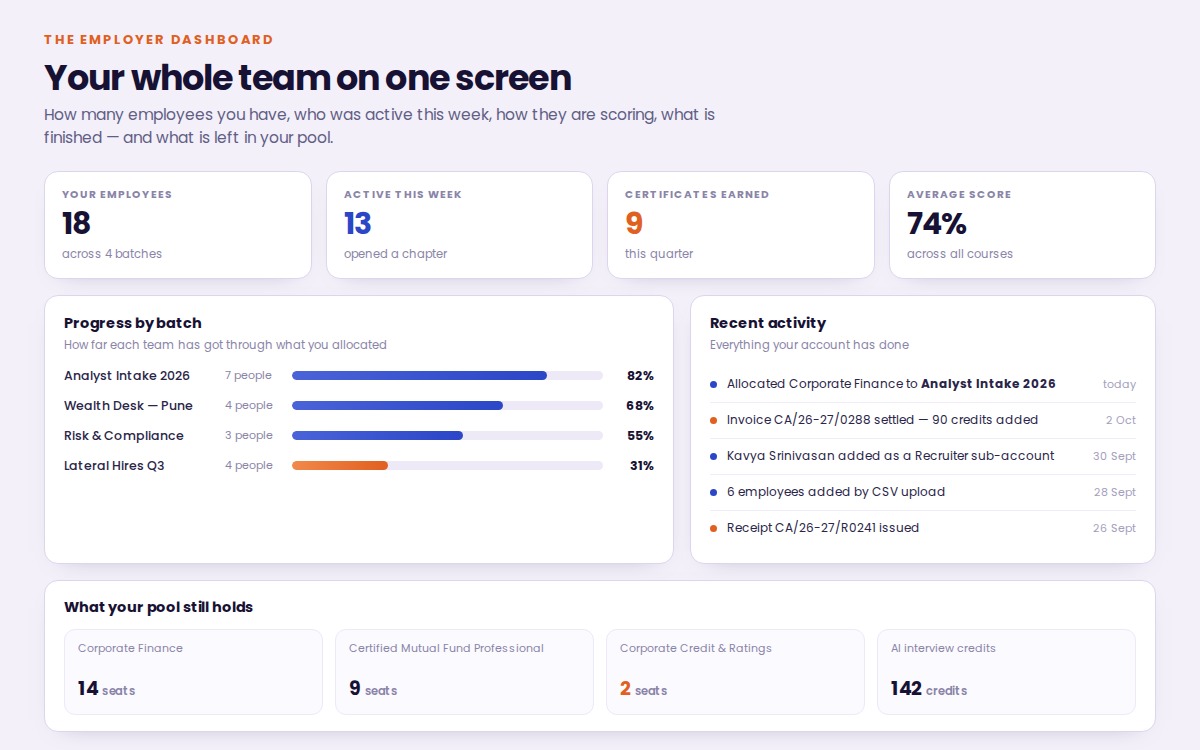
An employer portal to buy, allocate and track; an employee portal with 1000+ hours of proctored finance learning behind it; and a record for every employee that says exactly what they know.
Three steps from asking for access to seeing what your employees have done with it.
Tell us the courses, the seats and the credits you need. We confirm the price and raise your invoice — pay it online or by bank transfer.
Add your employees, tag them into batches, and hand out courses and credits yourself — one person or a whole batch at a time.
Watch progress, scores, skill reports and psychometric profiles build up against each employee, and see exactly what has been used.
Your employees, their progress and your pool — on one screen.
Everything your organisation runs itself — what you buy, who gets it, who on your team can do what, and the paperwork that follows.
One screen for the whole account: how many employees you have, who was active this week, how they are scoring, what is completed and what you still hold in your pool.
Pick the courses, the number of seats and any AI-interview credits. No prices on that screen and nothing charged — our team confirms the price and raises your invoice. Each seat carries a fixed access period, not lifetime access.
Add employees by email, by CSV upload or by pasting a list, and tag them into batches. You run the roster; you do not have to ask us for anything.
Give a course, a tool or interview credits to one employee or an entire batch in a single step, all out of your own pool. A seat runs for a set period — 90 days on most courses — and the clock starts when that employee first signs in, not when you hand it over, so nothing is wasted on someone who is away.
Your HR and L&D staff get their own logins at no extra charge, each with only the permissions you choose. Admin, Recruiter and Viewer are ready-made presets.
One roster showing each employee's department and batch, the courses they hold, how far they have got, their average score and their interview attempts.
Seats, tools and credits sit in your pool until you hand them out. The usage page shows the balance, every grant and every spend, with the invoice each came from.
Generated against your account and kept on the portal, searchable by number or month, with anything unpaid marked. Download any of them as a PDF.
Tag employees into teams — an intake, a desk, a location — then give a course or credits to the whole batch in one step, and read progress back the same way.
Open any employee and see their activity on the platform, every course and how far they have got, their quizzes and assessment scores, and their AI interview attempts.
Moving on, or handing the account to a colleague? Pass ownership to any team login — every employee, course access, credit and batch stays exactly as it is.
Settle by UPI, card or net banking and the receipt is issued at once. Or transfer by IMPS, RTGS or NEFT — we confirm it and send the receipt. Both produce the same paperwork.
What your employees sign into, and what comes back to you from it.
Certification programmes, vocational courses and 50-hour practitioner curricula — mutual funds, portfolio management, equity research, fund accounting, corporate credit, retail banking. Each course is open to an employee for its own access period.
Each hour is a chapter read in the browser, with a companion workbook and an infographic. Chapters unlock one at a time, so nobody can skip to the end.
Every hour ends with its own quiz. The camera is mandatory and snapshots are captured periodically through each attempt and kept for review. No face recognition, nothing deleted.
Big Five for working style, RIASEC for career fit and DISC for how someone communicates and decides — the same three instruments used in corporate hiring and development.
A breakdown across the topics the course covered, not one overall mark. You see where an employee is strong and where the gap is, which tells you what to train next.
Every hour comes with a companion Excel workbook to practise in and an infographic that puts the hour in one picture — not a wall of text and nothing else.
Jump straight to any hour or topic, and bookmark whatever needs revisiting. Coming back after a busy week does not mean starting the chapter again.
Each employee sees exactly what they hold on their own dashboard — the courses allocated to them, the Resume Maker and ATS Optimizer seats, and how many AI interview credits are left.
What your organisation buys is billed to you. If an employee buys anything for themselves — an extra course, more interview credits — that invoice and receipt sit on their own account, kept and downloadable.
Issued automatically on completion with a verification ID and a QR code, so an auditor, a regulator or a client can confirm it against our records.
Tell us how many employees you want to certify and we will show you what it looks like on your own account.